
Why Google Business Profile Gets Suspended (7 Reasons + Fixes)

We got it.
Thank you for contacting us.We’ll get back to you as soon as possible.
If you have logged into your Google account and found that your Google Business Profile has been suspended, you are not alone. Thousands of legitimate businesses face GBP suspensions every year — many without any prior warning.
A suspended profile means your business stops appearing in Google Search and Google Maps, directly cutting off inbound calls, website visits, and foot traffic.
In this guide, we cover:
- The two types of GBP suspension and how to tell which one you have
- The 7 most common reasons Google suspends a Business Profile
- Exactly how to fix each issue
- A step-by-step guide to submitting a reinstatement appeal that is more likely to succeed
- Answers to the most common questions business owners ask after a suspension
If you need professional help, our GBP reinstatement specialists are available for a free consultation at
https://www.reinstatementgbp.com/
Understanding the Two Types of Google Business Profile Suspension
Before diving into the reasons, it is important to understand which type of suspension you have received. The recovery process is different for each.
Soft Suspension
Your profile is still visible on Google Maps and Search, but you have lost the ability to manage, edit, or verify it. The 'Manage' button is gone from your dashboard. Soft suspensions are generally easier to recover from and may not require a formal appeal in all cases.
Hard Suspension
Your profile has been completely removed from Google Search and Google Maps. Potential customers searching for your business by name or category will not find it. A hard suspension is more serious and always requires a formal reinstatement appeal with supporting documentation.
How to Check Your Suspension Type
- Go to business.google.com and sign in.
- Look for a red or orange banner at the top of your dashboard.
- If your profile is still listed but you cannot manage it = Soft suspension.
- If your profile has disappeared entirely from Search and Maps = Hard suspension.
To avoid suspension, businesses must follow the official
Google Business Profile guidelines
The 7 Most Common Reasons Your Google Business Profile Gets Suspended
Below are the most common reasons businesses experience a Google Business Profile suspension.
Reason 1: Ineligible or Unverifiable Business Address
Google requires a verifiable, physical business address where you actually serve customers or operate from. The following address types will trigger a suspension:
- PO Boxes and virtual mailboxes (e.g., UPS Store, Regus, iPostal1)
- Coworking spaces or shared offices where you have no dedicated desk or signage
- Residential addresses that have been marked as a commercial location
- Addresses that do not match what Google Street View or satellite imagery shows
- Addresses that are inconsistent with your website, directories, or other online listings
How to Fix It
Use your genuine, physical business address. If you are a service-area business (e.g., a plumber, cleaner, or consultant who visits clients), hide your address in your GBP settings and set a service area radius instead. You do not need to display a physical address to have a verified GBP.
Reason 2: Keyword Stuffing in the Business Name
Your Google Business Profile name must match your real-world business name exactly — the name on your shopfront, website, receipts, and business cards. Adding keywords to inflate your ranking (e.g., 'Dallas Best Emergency Locksmith 24/7 Fast Response') is one of the most common and easily detected violations.
Google significantly improved its detection of keyword-stuffed business names in 2024 and 2025, and this now triggers both automated suspensions and manual reviews.
How to Fix It
Use only your legal trade name or your commonly-known brand name. Optimize for keywords in other areas instead — your business description, services section, Google Posts, and Q&A. These are all legitimate, policy-compliant ways to improve your local relevance without risking suspension.
Reason 3: Duplicate Listings for the Same Location
If Google detects two or more profiles for the same business at the same address, it may suspend one or all of them. This is more common than most business owners realise and happens when:
- A business changes its name and creates a new profile instead of editing the existing one
- A previous employee, agency, or marketing company created a separate listing
- Google auto-generated a profile from third-party data and the owner then created another one
- A franchise or chain listed multiple practitioners at the same physical location
How to Fix It
Before creating a new GBP, always search for your business on Google Maps first. If a duplicate already exists, claim it and request a merge via Google Support. Do not simply delete the duplicate — merging preserves your existing reviews.
Reason 4: Incorrect or Misleading Business Category
Choosing a primary category that does not accurately reflect your core service is a common trigger for suspension — especially when the category chosen appears designed to gain visibility rather than reflect the actual business type.
For example, listing a home-based consultancy as a 'Law Firm' or selecting 'Hospital' for a wellness blog to rank in a high-volume category will raise a red flag in Google's review systems.
How to Fix It
Select the most accurate, specific primary category for your core offering. Use secondary categories for additional legitimate services. If you are unsure of the right category, search for established competitors in your niche and see what primary category they use.
Reason 5: Making Rapid or Suspicious Profile Edits
Changing your business name, address, primary category, and phone number in quick succession sends a spam signal to Google's automated quality systems. This is especially risky in the following situations:
- Your profile is newly verified (under 30 days old)
- You are making changes from a new IP address or unfamiliar device
- Edits were made by a third-party agency or automated tool without proper authorisation
- You recently transferred ownership of the profile
How to Fix It
Space out significant profile changes by at least several days. If you need to make multiple edits, start with the least sensitive ones (photos, business hours, services) before updating core details like business name or address. Avoid using bulk management tools unless you are confident they are policy-compliant.
Reason 6: Violating Google's Content Policies
Google will suspend profiles that contain content breaching its Business Profile policies. This covers a wider range of issues than most owners expect:
- Fake, incentivised, or gated reviews (asking customers to leave a review only if it is positive)
- Offensive, inappropriate, or low-quality photos
- Listing services that Google considers prohibited — certain financial products, adult content, or regulated health services
- Misleading claims in your business description (e.g., false accreditations, fabricated awards)
- Using a GBP to promote a different business or redirect customers to an unrelated service
How to Fix It
Audit your business description, photos, services, and review acquisition practices against Google's Business Profile content policies. Remove or amend anything that could be considered misleading, incentivised, or inappropriate. If you use a review management platform, verify it does not engage in review gating.
Reason 7: Address Inconsistency Across the Web
If your business operates from one location but your GBP shows a different address — for example, if you list a prestigious city-centre address but actually operate from a suburb — Google will detect the inconsistency by cross-referencing signals from your reviews, photos, website, and third-party directories.
Even minor inconsistencies between your GBP listing, your website's footer, and your schema markup can raise flags during a manual review.
How to Fix It
Ensure your GBP address exactly matches your website, all social profiles, directory listings (Yelp, Bing Places, Apple Maps), and any LocalBusiness schema markup on your website. Consistency across all sources is one of the strongest trust signals in local SEO and is a key factor in reinstatement success.
How to Submit a Google Business Profile Reinstatement Appeal
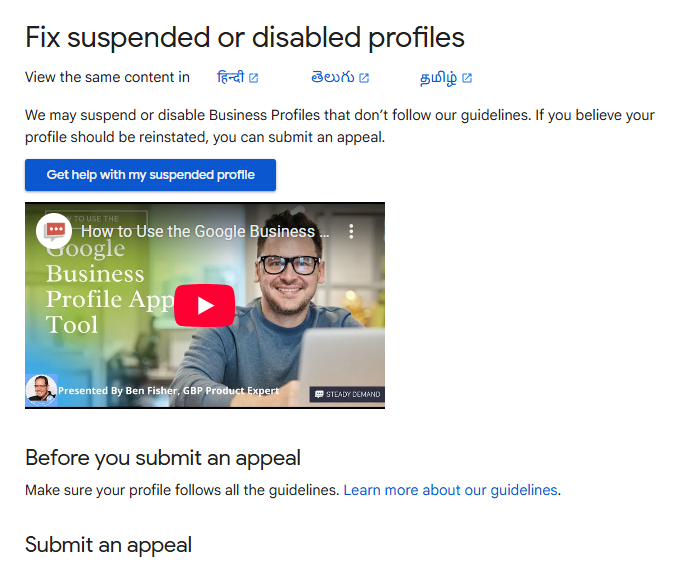
If your profile has been suspended, do not simply click 'Request Review' without preparing. A well-prepared appeal significantly increases your chances of a successful reinstatement on the first attempt.
Step-by-Step: The Reinstatement Process
- Identify and fix the violation first.
- Gather supporting documentation.
- Go to the reinstatement form.
- Complete the form carefully.
- Submit and wait for a decision.
- If rejected,
contact us.
How to Fix It
Ensure your GBP address exactly matches your website, all social profiles, directory listings (Yelp, Bing Places, Apple Maps), and any LocalBusiness schema markup on your website. Consistency across all sources is one of the strongest trust signals in local SEO and is a key factor in reinstatement success.
Frequently Asked Questions
How long does a Google Business Profile suspension last?
A GBP suspension does not expire automatically. Your profile remains suspended indefinitely until you successfully complete a reinstatement appeal and Google's review team approves your request. Decisions typically take 3 to 10 business days after submitting your appeal, though complex cases involving hard suspensions can take longer. There is no guaranteed timeline.
What is the difference between a soft suspension and a hard suspension?
A soft suspension means your profile is still visible on Google but you have lost access to manage it — the 'Manage' button disappears from your dashboard. A hard suspension means the profile has been completely removed from Google Search and Maps. Hard suspensions are more serious, require stronger supporting documentation during the reinstatement process, and take longer to resolve. If you are unsure which type you have, check your Google Business Profile dashboard for a red or orange status banner.
Can I create a new Google Business Profile if my existing one is suspended?
No. Creating a new profile for the same business while your existing profile is suspended is a direct violation of Google's policies and will result in the new profile also being suspended — often immediately. You must restore the original suspended profile through the reinstatement process.
Will my Google reviews be lost after a suspension?
For a soft suspension, your reviews are preserved and will remain visible once the profile is reinstated. For a hard suspension, the profile is removed from public view — but in most cases, the reviews are not permanently deleted. They are typically restored when the profile is successfully reinstated. However, there is no absolute guarantee in all cases, which is one more reason to address suspension issues quickly.
How long does the reinstatement process take?
Most standard reinstatement decisions are returned within 3 to 10 business days. However, this is not guaranteed, and some cases — particularly hard suspensions involving manual review escalations — can take 3 to 6 weeks. If you have not received a response after 14 days, you can follow up through the Google Business Profile Help Community or by requesting a support callback.
Can I prevent my Google Business Profile from being suspended?
Yes. The best prevention is to follow Google's Business Profile guidelines consistently. Keep your name, address, phone number, and category accurate and consistent across all platforms. Avoid making rapid changes to core profile fields. Never use keyword stuffing, fake reviews, or misleading content. Conduct a periodic audit of your profile — especially after any business changes — to ensure everything remains compliant.
GBP Suspension Prevention Checklist
Use this checklist to audit your profile and reduce your risk of future suspensions:
- Business name matches your real-world brand name exactly — no keywords added
- Physical address is verifiable and consistent across your website, directories, and GBP
- If service-area business: address is hidden and service radius is set
- Primary category accurately reflects your core business offering
- No duplicate listings exist for the same location
- Photos are original, high quality, and accurately represent the business
- Business description does not contain misleading claims or keyword stuffing
- Review acquisition process does not involve gating or incentivisation
- Profile edits are made gradually — not multiple major changes at once
- Schema markup on your website matches your GBP address and business name
Get a Free Consultation
If your Google Business Profile has been suspended, contact us today for a free assessment.
We will review your profile, identify the likely suspension reason, and advise you on the best path to reinstatement.
Need Professional Help with Your GBP Reinstatement?
Navigating a Google Business Profile suspension — especially a hard suspension — can be time-consuming and frustrating, particularly when your livelihood depends on being visible in local search.
Our GBP reinstatement specialists have successfully recovered hundreds of suspended profiles across a wide range of industries. We handle the entire appeal process, from diagnosing the suspension reason to preparing documentation and submitting the formal reinstatement request on your behalf.
Get a Free Consultation
If your Google Business Profile has been suspended, contact us today for a free assessment.
We will review your profile, identify the likely suspension reason, and advise you on the best path to reinstatement.